Colour Spaces, and Why Your Gradient Goes Grey
Your gradient goes grey in the middle, and gamma is not the reason. sRGB, CIELAB and OKLCH compared, with the midpoints computed rather than asserted.
Date
Category
Writer

Put pure blue next to pure yellow and let the browser fill in the middle. The colours are #0000FF and #FFFF00. Every channel is either 0 or 255, so the halfway value on every channel is 127.5, which rounds to 128, which is #808080. Mid grey. Not a muddy blue-green, not a dull olive: the exact centre of the achromatic axis, with a measured chroma of 0.000.
That is not a browser bug and it is not a rounding error. It is what averaging three numbers does. The interesting part is that the fix most people reach for, working in linear light instead of gamma-encoded sRGB, does not fix it either. I believed for years that it did.
What the transfer function actually does
sRGB is not a set of numbers proportional to light. The W3C's sRGB specification defines an encoding with a short linear segment near black and a power curve above it. Below a linear value of 0.0031308 the encoded value is the linear value multiplied by 12.92. Above it, the encoded value is 1.055 times the linear value raised to the power 1/2.4, minus 0.055. The decode threshold is the same boundary run through the linear segment: 0.0031308 times 12.92, which is 0.04045.
The specification is candid about why the curve has that shape: "The effect of the above equations is to closely fit a straightforward gamma 2.2 curve with an slight offset to allow for invertability in integer math." The misspelling is in the original.
Björn Ottosson, writing in December 2020, put the consequence plainly: "color processing, as normally implemented, neither capture how colors behave in the real world nor how humans perceive them, it is just a byproduct of how the color space has been defined". When you blend two saturated opposing colours in encoded sRGB, he writes, "As the colors blend they shift to be much darker and bluer", because "sRGB darkens colors significantly when mixing saturated opposing colors". His recommendation is to "use a linear version of sRGB when doing any sort of blending, blurring, resizing or transparency blending".
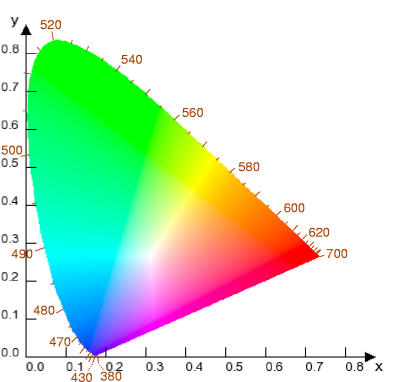
The CIE 1931 chromaticity diagram. Equal distances on it are not equal perceptual steps, which is the problem every later space tries to fix. Public domain, via Wikimedia Commons.
The correction: linearising does not save the gradient
He is right, and this is where the popular retelling goes wrong. I have heard it said, and have said it myself, that the grey middle in a blue-to-yellow gradient is a gamma problem. It is not. Decode both endpoints to linear light, average them there, and re-encode, and the midpoint is #BCBCBC. Still grey. Measured chroma, again, 0.000.
Linearising changed the lightness of the middle and nothing else. It went from a mid grey to a light grey, which is the correct physical answer for equal amounts of blue and yellow light, and is exactly as dead as before.
The reason is structural. In any three-channel space whose axes are red, green and blue, mixing two colours on opposite sides of the hue circle drags the result toward the point where the three channels are equal, and that point is neutral. Gamma decides where on the grey axis you land. It has no opinion about whether you land on it. Blue and yellow are near-complementary, so they land on it hard.
Lab, and what it fixed and did not fix
CIE L*a*b* separates lightness from two opponent axes. In CSS, lab() takes L from 0 to 100 where "0 corresponds to black, 100 corresponds to white", and a and b nominally from -125 to 125, negative a toward green and positive a toward red, negative b toward blue and positive b toward yellow, with MDN noting the axes are "theoretically unbounded" and in practice do not exceed about ±160. MDN describes it as representing "the entire range of colors that humans can see", which is the useful property: it is not tied to a display gamut.
Pulling lightness out into its own axis is genuinely worth having. It means you can hold L constant and vary hue, and get a palette whose members are the same weight. But Lab has a known failure, and Ottosson names it: "Largest issue is their inability to predict hue. In particular blue hues are predicted badly." If you rotate hue at constant a-b radius in Lab, blues drift toward purple on the way. For a designer this shows up exactly where you least want it, in the darker end of a blue ramp.
Oklab
Ottosson published Oklab on 23 December 2020. The construction is worth knowing because it explains what the space is and is not. He took "a color space with the same structure as IPT" and optimised its parameters against three datasets: lightness pairs generated from CAM16, chroma pairs generated from CAM16, and the Ebner-Fairchild constant-hue data. The fit was evaluated with CIEDE2000 colour differences. His summary of the method: "Oklab was derived by optimizing the parameters of a color space with the same structure as IPT, to get a low error on all the datasets."
One detail I like, because it shows how close the result sits to a clean form: the fitted exponent for the non-linearity "ended up very close to 1/3, 0.323", and he forced it to exactly 1/3. The space is built for a D65 white point, which is the same white point as sRGB, so no chromatic adaptation is needed on the way in.
On hue, which was the whole point, his comparison table gives a hue RMS error of 0.49 for Oklab against 0.69 for CIELAB.
OKLCH is the same space in polar coordinates: L, chroma, hue angle. In CSS, oklch() takes L from 0 to 1 or 0% to 100%, C from 0 with a practical ceiling around 0.4 (100% maps to 0.4), and H as an angle. That polar form is the part that matters for gradients, because it lets an interpolation travel around the hue circle instead of across it.
The same gradient, four ways
Here is the actual CSS, and then the actual numbers.
I converted the endpoints to Oklab using the matrices Ottosson publishes, with the sRGB to XYZ matrix derived from the primaries and white point above, and interpolated each way. The endpoints in OKLCH are L 0.452, C 0.313, H 264.1 for the blue and L 0.968, C 0.211, H 109.8 for the yellow. The midpoints:
Interpolation | Midpoint | Oklab chroma | In sRGB gamut |
|---|---|---|---|
sRGB, encoded | #808080 | 0.000 | yes |
sRGB, linear light | #BCBCBC | 0.000 | yes |
Oklab, rectangular | #6CABC7 | 0.077 | yes |
OKLCH, polar | #00CFBD approx | 0.262 | no |
Two things in that table deserve more attention than they usually get.
First, the rectangular Oklab midpoint has a chroma of 0.077, against endpoint chromas of 0.313 and 0.211. It is a pale, chalky blue. Switching to Oklab and stopping there buys you a correct lightness curve and still gives you a washed-out middle. This is not a theoretical worry. In a CSS Working Group thread on 21 February 2025 about whether legacy colours should also interpolate in Oklab by default, a participant argued for keeping things as they are, writing "I would personally be in favour of keeping the existing sRGB + oklab behaviour", on the grounds that the automatic conversion made a gradient on an existing test page look washed-out. The spec's own contributors can see it.
Second, the OKLCH midpoint is out of the sRGB gamut. Carrying chroma round the hue circle from a saturated blue to a saturated yellow routes you through a cyan that sRGB cannot display. The browser has to gamut-map it, and how it does that determines what you actually see. So the polar path is not free: it trades a dead middle for a clipped one.
What browsers do
lab(), lch(), oklab() and oklch() shipped in Safari 15, Chrome 111, Edge 111 and Firefox 113, with Chrome and Edge 110 and Firefox 111 to 112 supporting them behind a flag. Can I Use puts global support at 94.27%. MDN records oklch() as Baseline widely available, "available across browsers since May 2023". CSS Color Module Level 4, which defines them, is a W3C Candidate Recommendation Draft.
The interpolation rules are the part that trips people. MDN states the default flatly: "When interpolating <color> values, the interpolation color space defaults to Oklab." The allowed rectangular spaces are srgb, srgb-linear, display-p3, a98-rgb, prophoto-rgb, rec2020, lab, oklab, xyz, xyz-d50 and xyz-d65; the polar ones are hsl, hwb, lch and oklch. Hue interpolation defaults to shorter hue, with longer, increasing and decreasing available.
But "legacy" colours, meaning hex, rgb(), hsl() and the named colours, keep interpolating in sRGB. That is the "existing sRGB + oklab behaviour" the working group thread is about. So this is true today and is the single most practically useful sentence in this piece:
Writing your two stops as hex gets you an sRGB gradient. Writing the identical colours as oklch() gets you an Oklab gradient. Same colours, different middle, and nothing in the syntax warns you.
A designer's comparison
Property | sRGB | Linear sRGB | CIELAB / LCH | Oklab / OKLCH |
|---|---|---|---|---|
Lightness axis | none, mixed into channels | none, mixed into channels | separate, L 0-100 | separate, L 0-1 |
Equal L looks equally light | no | no | broadly yes | broadly yes |
Hue stable when you change lightness | no | no | drifts, worst in blue | best available, hue RMS 0.49 vs 0.69 |
Blend of complements | neutral grey | lighter neutral grey | desaturated | desaturated if rectangular, saturated if polar |
Can express colours outside the display gamut | no | no | yes | yes |
CSS function | hex, rgb(), hsl() | in srgb-linear | lab(), lch() | oklab(), oklch() |
How I use it, and what I still do not know
Three working rules came out of this for me.
Define palettes in OKLCH. Holding L constant across a set of hues produces swatches that carry the same weight, which is the thing hex and HSL cannot do: HSL's L is a geometric construction, not a perceptual one, and a fully saturated HSL yellow at 50% lightness is far brighter than an HSL blue at the same number.
For gradients, choose the space per gradient rather than by policy. Between two colours less than roughly 90 degrees apart in hue, in oklab is right and quiet. Between near-complements, in oklch is the only thing that keeps the middle alive, and you must then look at what the gamut mapping did to it rather than trusting the number.
Stop treating "use linear light" as the cure. It is the cure for compositing, blurring and resizing, which is what Ottosson recommends it for. It is not the cure for a gradient that looks dead in the middle, and the #BCBCBC above is the proof.
What I cannot tell you: exactly what each engine does when an OKLCH interpolation leaves the sRGB gamut. CSS Color 4 specifies a gamut mapping procedure, but I have not tested the shipped implementations against each other in this session, and I would not assume they agree. If a gradient matters at the pixel level, render it in the browsers you care about and look, rather than trusting either the spec or this article.
Sources
W3C, "A Standard Default Color Space for the Internet: sRGB", W3C. Encoding equations 1.2a and 1.2b, the 0.0031308 threshold, the 12.92, 1.055 and 0.055 coefficients, the 1/2.4 exponent, the "closely fit a straightforward gamma 2.2 curve" statement, the BT.709 primaries and the D65 white point. https://www.w3.org/Graphics/Color/sRGB.html
Björn Ottosson, "A perceptual color space for image processing", 23 December 2020. Oklab's derivation from an IPT-structured model fitted to CAM16 lightness and chroma data and the Ebner-Fairchild hue data, the 0.323 exponent forced to 1/3, the hue RMS comparison of 0.49 against CIELAB's 0.69, the criticism of CIELAB's blue hue prediction, and the conversion matrices. https://bottosson.github.io/posts/oklab/
Björn Ottosson, "How software gets color wrong", 3 December 2020. The darkening and hue shift when blending saturated opposing colours in encoded sRGB, and the recommendation to work in linear sRGB for blending, blurring and resizing. https://bottosson.github.io/posts/colorwrong/
W3C, "CSS Color Module Level 4", Candidate Recommendation Draft. Definitions of oklab() and oklch(), the interpolation and hue interpolation sections. https://www.w3.org/TR/css-color-4/
MDN Web Docs, "color-interpolation-method". The default interpolation colour space of Oklab, the lists of rectangular and polar spaces, and the shorter/longer/increasing/decreasing hue keywords. https://developer.mozilla.org/en-US/docs/Web/CSS/color-interpolation-method
MDN Web Docs, "oklch()". Syntax, L, C and H ranges, and the Baseline note that it has been available across browsers since May 2023. https://developer.mozilla.org/en-US/docs/Web/CSS/color_value/oklch
MDN Web Docs, "oklab()" and "lab()". Component ranges for both functions and the description of Lab as covering the range of colours humans can see. https://developer.mozilla.org/en-US/docs/Web/CSS/color_value/lab
Can I Use, "CSS lch() and lab() color values". Support from Safari 15, Chrome 111, Edge 111, Firefox 113, and global support of 94.27%. https://caniuse.com/css-lch-lab
CSS Working Group discussion, "[css-color-4] What if legacy colors also interpolated in Oklab by default? (#7948)", public-css-archive, 21 February 2025. The "existing sRGB + oklab behaviour" and the washed-out gradient objection. https://lists.w3.org/Archives/Public/public-css-archive/2025Feb/0699.html
Related reading
Latest Articles.
© Moc Mallen Studio
Thoughts, ideas, and perspectives on design, simplicity, and creative process.


